The Forex V Portfolio v.11 is a carefully assembled collection of 28 expert advisors (EAs) that trade independently across 14 uncorrelated currency pairs on the H1 timeframe. Each pair is covered by a dedicated buy EA and a dedicated sell EA, creating a neutral, multi‑directional strategy that does not rely on a single market bias. The system is designed for traders who want steady, long‑term growth without sitting in front of screens all day — simply install on a VPS or always‑on computer, and let the algorithms do the heavy lifting.
💡 No computer or technical skills? We offer a fully managed solution — our team runs the same portfolio on our own servers. Explore the Forex account management service →
💰 Price: $249 USD
Special price $200 USD for direct wallet‑to‑wallet payments via:
- Cryptocurrency (Bitcoin, USDT, Ethereum) — request a wallet address
- SWIFT bank wire transfer (Proforma Invoice provided)
- Western Union — contact us for recipient details
🔒 PayPal is available through the green "Add to cart" button for immediate, secure payment.
This page and all payment details are valid as of today. You can always confirm real‑time trading activity on our YouTube channel.
📦 Delivery: After payment, the complete ZIP pack (expert advisors + indicators + instructions) is sent automatically to your email. Remote installation via AnyDesk is included for free — just send us your timezone and a convenient slot.
📧 Contact: forexfactory1shop@gmail.com | WhatsApp/Telegram: +995511167545
📺 See the Portfolio Running Live
All trades are broadcast in real time on our YouTube channel directly from a live broker account. This is not a backtest — you see every entry and exit as it happens.

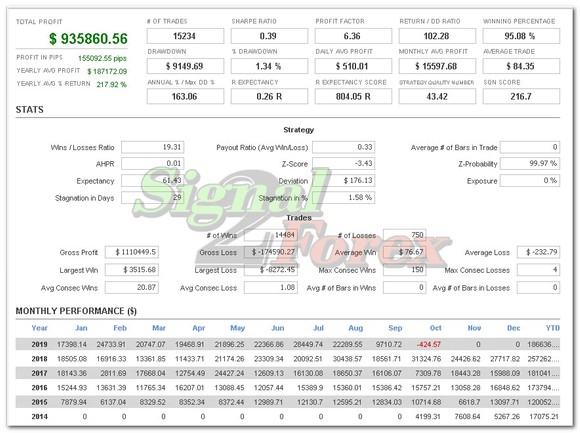
📊 Verified Track Records (Myfxbook)
Below are independently verified Myfxbook accounts showing the portfolio’s performance year by year. All accounts have 100% profit withdrawn to demonstrate real‑world results.
2026
2025
2024
2023
2022
2021
2020–2021
View 2020–2021 verified account
2019–2020
2018
📎 Full portfolio history statement (5 years): Download here
⚙️ What You Receive
The ZIP archive contains 28 expert advisors and 12 custom indicators. Below is the exact file list:
Expert Advisors (1 buy + 1 sell per pair)
- AUDCAD Buy
- AUDCAD Sell
- AUDCHF Buy
- AUDCHF Sell
- AUDJPY Buy
- AUDJPY Sell
- AUDUSD Buy
- AUDUSD Sell
- CADCHF Buy
- CADCHF Sell
- CADJPY Buy
- CADJPY Sell
- EURAUD Buy
- EURAUD Sell
- EURCAD Buy
- EURCAD Sell
- EURGBP Buy
- EURGBP Sell
- EURUSD Buy
- EURUSD Sell
- GBPUSD Buy
- GBPUSD Sell
- NZDUSD Buy
- NZDUSD Sell
- USDCHF Buy
- USDCHF Sell
- USDJPY Buy
- USDJPY Sell
Custom Indicators
- Aroon Up/Down
- AvgVolume
- BBandWidthRatio
- CCI
- GenBuilder Pattern Recognition
- KeltnerChannel
- LinReg
- Momentum
- Pivots
- QQE_ADV
- RSI
- TEMA

🖥️ What You Need to Get Started
- A reliable forex broker account — we recommend Exness (ECN account for low commissions) or any popular broker.
- A PC, laptop, or a Forex VPS (from ~$15/month) running MetaTrader 4 or 5, online 24/5.
- An initial deposit — see the FAQ for recommended lot sizes and balances.
- The portfolio pack (delivered instantly after payment).
- Installation tutorial: watch here.
❓ Frequently Asked Questions
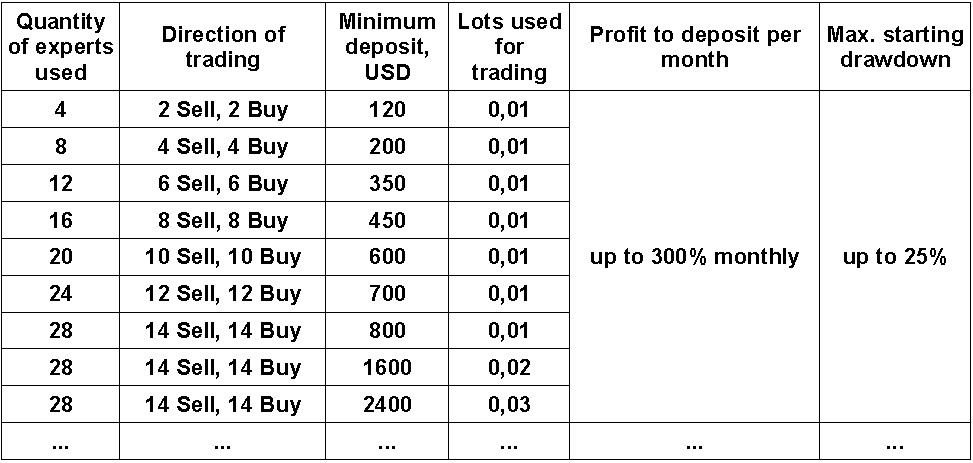
What lot size and deposit should I use? What profit and drawdown can I expect?
Below is a guideline based on historical performance. Always start with a demo to find your comfort level.
I'm not familiar with forex robots but I know MetaTrader. Can you install everything for me?
Absolutely. We use AnyDesk remote desktop to set up the entire portfolio on your PC or VPS — just agree on a time with us.
Which broker account works best?
Any well‑known broker is fine. ECN accounts with low commissions are ideal. We personally use Exness, but the choice is yours.
What about a VPS?
Choose a reputable VPS provider (pricing around $15/month or higher). Very cheap VPS services can cause connection issues that hurt your trading.
What strategy do the robots use?
They combine multiple technical indicators and a self‑correlation logic. By trading small lots in both directions across 14 different pairs, the system reduces overall risk and avoids heavy drawdowns.
How do I pay if PayPal doesn’t work for me?
We support WebMoney, Bitcoin, USDT, SWIFT bank transfer, and Western Union. Just send us a message and we’ll provide the details.
How do I receive the files?
Our system automatically emails the download link right after payment is confirmed.
Do you provide updates?
Yes, free updates are sent to your email approximately every 6 months.
How do I install the EAs myself?
- In MetaTrader 4, go to File → Open Data Folder.
- Copy the *.ex4 advisor files into the Experts folder, and indicator *.ex4 files into the Indicators folder.
- Restart MT4.
- Open 28 charts — two H1 charts for each of the 14 currency pairs (one for the buy EA, one for the sell EA).
- Drag each expert advisor from the Navigator onto its corresponding chart. Only the EA needs to be attached; indicators load automatically.
Must I run both buy and sell EAs?
Yes, the system is designed to trade both directions simultaneously. Running only one side breaks the risk balance.
How long until the first trades appear?
Between 01:00 and 23:50 server time, you should see the first trades within an hour if all 28 EAs are correctly attached.
No trades are opening — what should I check?
Use the following checklist (click images to enlarge):
- Smiley faces are visible in the top‑right corner of every chart.

- In each EA’s properties (F7), the “Allow Auto Trading” checkbox is ticked.
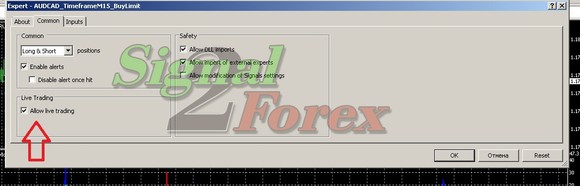
- The main “AutoTrading” button on the toolbar is enabled.

- Check the Experts and Journal tabs for error messages.
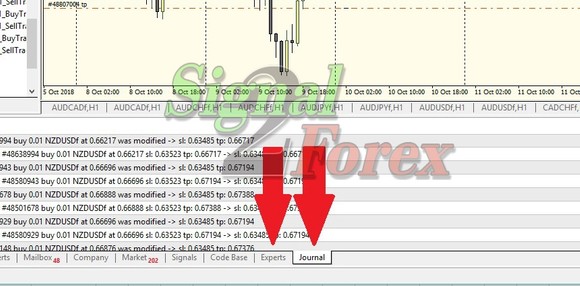
- Manual trades can be opened with 0.01 lot (to ensure the account is not in close‑only mode).

- The symbol names are black (not grey) in the Market Watch window.

- Ensure you are using the correct account (for unlimited versions).
If still nothing after an hour, install AnyDesk and contact us for direct assistance.
How can I run multiple MT4 instances or clone my setup?
Navigate to your broker’s installation folder (usually in C:\Program Files (x86)\), copy the entire folder, paste it elsewhere, and run terminal.exe from the copy. To mirror the first setup, copy all files from the first Data Folder into the second (after deleting the second’s original content).
Are there any account limits?
No limits — the portfolio works on an unlimited number of demo or real accounts.
Do you offer a refund?
Yes, a full refund is available within 30 days if the portfolio does not perform as described. We’ll first verify the issue via AnyDesk or by checking your account history statement.
How do I export my account history to send to you?
In the Terminal window, go to the Account History tab, right‑click → “All History”, then right‑click again → “Save as Detailed Report”.

How can I see the commissions my broker charges?
In the Market Watch window, right‑click and select “Spread”. The displayed value shows your trading cost. For example, a spread of 20 on GBP/USD (5‑digit quotes) means you pay $0.2 per 0.01 lot. Always aim for an ECN account to minimize these costs.

🧑💻 Free Remote Installation
We will install the entire portfolio on your computer or VPS using AnyDesk. Simply provide your timezone and a convenient time.
📧 Email/Teams: forexfactory1shop@gmail.com
📱 WhatsApp/Telegram: +995511167545
Financial independence through automated, diversified trading — the Forex V Portfolio v.11.
Return to the main portfolio page